Instructors, would you like to use PLATO for your courses?
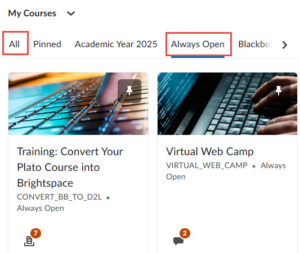
When you log into PLATO/Brightspace you will see the Training: Convert your Plato Course to Brightspace.
In this training course, you will learn the basics of migrating your course to the online format and some best practices in online teaching.
If you have used Plato in the past, but are new to PLATO/Brightspace, this course will help you to convert your previous courses to the new LMS format while learning how to use the new tools.
You may have to sort by All or Always Open to find the training course.
If you are teaching face to face and have not used PLATO in the past, you will need to complete the quick Going Green training. Just send an email to cit@westfield.ma.edu to let us know that you need this training.
If you are scheduled to teach an online, hybrid or remote synch course, ask your Department Chair to sign you up for the Virtual Web Camp Training Where you will learn all about online pedagogy and best practices.
Need assistance? email Lisa Clark lclark@westfield.ma.edu
Zoom in Plato
At the start of a new semester and in each Plato course you will need to add a new Zoom link in your PLATO course.
For help or questions email us at cit@westfield.ma.edu
Self Help Resources
Go to the PLATO Home Page to find lots of Self Help Resources – click on the Faculty tab for even more great resources.
The CIT Website offers even more resources such as Pedagogy, Diversity, Inclusion and more.
Contact the Center for Instructional Technology
The best way get help is to visit the Plato Help Desk and Submit a Plato Help Ticket!
Or you can also email us at the Center for Instructional Technology at cit@westfield.ma.edu
If needed, we can schedule a Zoom Session.